About   Users   Help
Users & Guests Online
On Page: 1
Directory: 233
Entire Site: 3 & 1291
Page Staff: tgags123, pokemon x, tgags123, supercool22, SonicOlmstead, Barathemos, Furret, geeogree,
09-19-26 02:33 AM

Thread Information

Views
2,649
Replies
5
Rating
3
Status
CLOSED
Thread
Creator
tRIUNE
10-30-14 01:08 AM
Last
Post
thehedgehogsonic
11-01-14 04:04 PM
Rating
8.8
Additional Thread Details
Views: 1,117
Today: 0
Users: 4 unique
Last User View
05-26-18
Matthew2321

Thread Actions

Thread Closed
New Thread
New Poll
Order
 

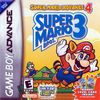
Super Mario Bros 3. e-Levels Collection

 
Game's Ratings
Overall
Graphics
Sound
Addictiveness
Depth
Story
Difficulty
Average User Score
8.8
9.3
8.8
8.4
9.4
8.5
7.5

10-30-14 01:08 AM
tRIUNE is Offline
| ID: 1098702 | 528 Words

tRIUNE
Level: 196


POSTS: 9582/12374
POST EXP: 624776
LVL EXP: 106139702
CP: 241092.3
VIZ: 7097887

Likes: 3  Dislikes: 0
Cited from Wikipedia

Super Mario Advance 4, excluding the European version of the game, is compatible with the Nintendo e-Reader, allowing players to scan certain e-Cards into the device utilizing two Game Boy Advances, the e-Reader, and a copy of Super Mario Advance 4. Once a card is scanned, it adds certain content to the game. One of the most prominent features included is the ability to add stages to the game; the player is allowed to have 32 extra stages on one copy of the game.

Cited from The Nintendo Wiki

Level Cards will give the player new levels that weren't present in any version of the game. They can only be accessed by swiping an e-Reader card. The Game Pack can hold a total of thirty two stages. In order to add more levels, you'll have to go to a special Level Scan Portal on the game's map that is glowing. After you're there, you'll have to press the A button to start the process. After that a Lakitu will appear at the top right of the stage and an screen will pop up telling you to swipe the card. Once you've done so, you'll shortly be able to play the stage you've just scanned. The only way to save the level to the game's memory is to beat it.
The Nintendo e-Reader

So now that you know about these levels, you might be happy to know that they can be played using the RGR Plugin. I've uploaded 2 save files which have a total of 37 e-Levels to play.
After you've loaded this game from the page, close the game window and extract the downloaded save file. The extracted file for both of those downloads will have the same name: Super Mario Advance 4 - Super Mario Bros. 3 (USA), you'll have to move that file into your RGR Plugin Data folder. The save file must have that exact name in order to work.

Note that if you already have saved data for this game, placing one of these save files in your Plugin Data folder will overwrite the existing file and your data will be lost. To avoid losing your save file, you can move your existing file (which will have the same name as the downloaded file) to a different location on your computer before moving one of the downloaded files to the folder. To access your existing save file, move the file back. Or you can save the state with F2 before placing the downloaded file in the folder, as save states won't be overwritten.

Here's the location of the folder on your computer to place the file in, (User-53134 is my user folder) replace '53134' with your user id:
    Windows 8, 7, Vista - C:ProgramDataVizzedVizzedRgrPluginUser-53134VBASaves

    Windows XP - C:Documents and SettingsAll UsersApplication DataVizzedVizzedRgrPluginUser-53134VBASaves

    Or go to:

    Start Menu > All Programs > Vizzed Retro Game Room > Open Plugin Data Folder > User-53134 > VBA > Saves

Cited from Wikipedia

Super Mario Advance 4, excluding the European version of the game, is compatible with the Nintendo e-Reader, allowing players to scan certain e-Cards into the device utilizing two Game Boy Advances, the e-Reader, and a copy of Super Mario Advance 4. Once a card is scanned, it adds certain content to the game. One of the most prominent features included is the ability to add stages to the game; the player is allowed to have 32 extra stages on one copy of the game.

Cited from The Nintendo Wiki

Level Cards will give the player new levels that weren't present in any version of the game. They can only be accessed by swiping an e-Reader card. The Game Pack can hold a total of thirty two stages. In order to add more levels, you'll have to go to a special Level Scan Portal on the game's map that is glowing. After you're there, you'll have to press the A button to start the process. After that a Lakitu will appear at the top right of the stage and an screen will pop up telling you to swipe the card. Once you've done so, you'll shortly be able to play the stage you've just scanned. The only way to save the level to the game's memory is to beat it.
The Nintendo e-Reader

So now that you know about these levels, you might be happy to know that they can be played using the RGR Plugin. I've uploaded 2 save files which have a total of 37 e-Levels to play.
After you've loaded this game from the page, close the game window and extract the downloaded save file. The extracted file for both of those downloads will have the same name: Super Mario Advance 4 - Super Mario Bros. 3 (USA), you'll have to move that file into your RGR Plugin Data folder. The save file must have that exact name in order to work.

Note that if you already have saved data for this game, placing one of these save files in your Plugin Data folder will overwrite the existing file and your data will be lost. To avoid losing your save file, you can move your existing file (which will have the same name as the downloaded file) to a different location on your computer before moving one of the downloaded files to the folder. To access your existing save file, move the file back. Or you can save the state with F2 before placing the downloaded file in the folder, as save states won't be overwritten.

Here's the location of the folder on your computer to place the file in, (User-53134 is my user folder) replace '53134' with your user id:
    Windows 8, 7, Vista - C:ProgramDataVizzedVizzedRgrPluginUser-53134VBASaves

    Windows XP - C:Documents and SettingsAll UsersApplication DataVizzedVizzedRgrPluginUser-53134VBASaves

    Or go to:

    Start Menu > All Programs > Vizzed Retro Game Room > Open Plugin Data Folder > User-53134 > VBA > Saves


--------------------

Vizzed Elite
Former Admin

Hero of Hyrule


Affected by 'Laziness Syndrome'

Registered: 06-09-10
Last Post: 1843 days
Last Active: 1821 days

(edited by tRIUNE on 10-30-14 02:53 AM)     Post Rating: 3   Liked By: patar4097, Sword Legion, thephantombrain,

10-30-14 01:27 AM
fightorace is Offline
| ID: 1098705 | 40 Words

fightorace
Level: 72

POSTS: 1156/1194
POST EXP: 68908
LVL EXP: 3186936
CP: 1803.0
VIZ: 17921

Likes: 0  Dislikes: 0
Another great thing you are doing for us here on vizzed.  Thanks for all the games you keep adding even when I think there are none left to add. Good work.  BTW you must be some kind of tech genius.


Trusted Member
try me at tekken 6


Affected by 'Laziness Syndrome'

Registered: 05-19-10
Location: Indianapolis
Last Post: 3139 days
Last Active: 3042 days

10-30-14 03:39 AM
Spicy is Offline
| ID: 1098716 | 34 Words

Spicy
imamonster
Level: 105


POSTS: 1742/3058
POST EXP: 192542
LVL EXP: 11967690
CP: 11971.3
VIZ: 30407

Likes: 0  Dislikes: 0
That's possible!? Wow, somethings you post here I never imagined to be possible that's so awesome.

I'm gonna do this sometime, as I actually beated the game a while back I believe. Thanks
That's possible!? Wow, somethings you post here I never imagined to be possible that's so awesome.

I'm gonna do this sometime, as I actually beated the game a while back I believe. Thanks

--------------------
Trusted Member

Affected by 'Laziness Syndrome'

Registered: 01-01-13
Last Post: 3403 days
Last Active: 1674 days

10-30-14 04:30 PM
RetroGameNinja is Offline
| ID: 1098932 | 25 Words

RetroGameNinja
Level: 47


POSTS: 378/468
POST EXP: 22100
LVL EXP: 742833
CP: 6051.7
VIZ: 18132

Likes: 0  Dislikes: 0
Hey, what about regular E-reader games? Think you could upload those? Here is an E-reader site:
http://ereader.vze.com/

Anyways, nice job! Can't wait to play these!
Hey, what about regular E-reader games? Think you could upload those? Here is an E-reader site:
http://ereader.vze.com/

Anyways, nice job! Can't wait to play these!

--------------------
Member
This is COOL.


Affected by 'Laziness Syndrome'

Registered: 12-23-11
Last Post: 1977 days
Last Active: 11 days

10-30-14 05:24 PM
tRIUNE is Offline
| ID: 1098963 | 103 Words

tRIUNE
Level: 196


POSTS: 9584/12374
POST EXP: 624776
LVL EXP: 106139702
CP: 241092.3
VIZ: 7097887

Likes: 0  Dislikes: 0
fightorace : I'll probably never run out of games to add, right now I have about 20-30 new hacks in a folder which I have yet to upload. Also, I wouldn't consider myself a tech genius, thanks though.

imamonster : Thanks for your feedback.

RetroGameNinja : It is possible for other e-Reader games to be available. Most of the e-Reader games are available as save files which can be loaded into either the e-Reader ROM or the ROM for the game which the e-files are for. I planning on looking into how to go about adding more of the e-Reader games when I have free time.

fightorace : I'll probably never run out of games to add, right now I have about 20-30 new hacks in a folder which I have yet to upload. Also, I wouldn't consider myself a tech genius, thanks though.

imamonster : Thanks for your feedback.

RetroGameNinja : It is possible for other e-Reader games to be available. Most of the e-Reader games are available as save files which can be loaded into either the e-Reader ROM or the ROM for the game which the e-files are for. I planning on looking into how to go about adding more of the e-Reader games when I have free time.

--------------------

Vizzed Elite
Former Admin

Hero of Hyrule


Affected by 'Laziness Syndrome'

Registered: 06-09-10
Last Post: 1843 days
Last Active: 1821 days

11-01-14 04:04 PM
thehedgehogsonic is Offline
| ID: 1099953 | 19 Words

Level: 22

POSTS: 64/81
POST EXP: 7169
LVL EXP: 51944
CP: 868.3
VIZ: 33754

Likes: 0  Dislikes: 0
Everybody here, I all wanted to let you know this was my idea to add this add on content.

--------------------
Member

Affected by 'Laziness Syndrome'

Registered: 10-24-12
Last Post: 3195 days
Last Active: 2549 days

Page Comments

Dove4JS - 12-12-20 05:26 AM
no image
joldboy70 - 07-10-20 11:13 AM
test
joldboy70 - 07-10-20 11:12 AM
test
savage23157 - 04-08-20 01:33 PM
Hi im new vizzed
zokuza - 11-18-19 09:08 AM
final got playstaion games unlock yes baby digimon world here i com
yoshirulez! - 02-10-17 08:45 PM
MAY MAYS
yoshirulez! - 02-10-17 08:45 PM
maymays
yoshirulez! - 02-07-17 11:13 PM
OwO what's this?
yoshirulez! - 02-07-17 11:13 PM
OwO what's this?
yoshirulez! - 02-07-17 11:13 PM
OwO what's this?

Adblocker detected!

Vizzed.com is very expensive to keep alive! The Ads pay for the servers.

Vizzed has 3 TB worth of games and 1 TB worth of music.  This site is free to use but the ads barely pay for the monthly server fees.  If too many more people use ad block, the site cannot survive.

We prioritize the community over the site profits.  This is why we avoid using annoying (but high paying) ads like most other sites which include popups, obnoxious sounds and animations, malware, and other forms of intrusiveness.  We'll do our part to never resort to these types of ads, please do your part by helping support this site by adding Vizzed.com to your ad blocking whitelist.

×